About Accessing the Screen Painter or Menu Painter
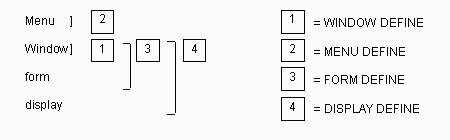
Menus, windows, forms and displays are the major objects to be painted. The Menu Painter and Screen Painter enable you to define these objects in many ways:
- Use the WINDOW DEFINE command to paint windows.
- Use the MENU DEFINE command to access the Menu Painter to paint menus. The UNIX Menu Painter and the Windows Menu Painter present different user interfaces than the one used in painting windows, forms, and displays.
- Use FORM DEFINE or DISPLAY DEFINE to paint forms or displays, respectively. Paint the form or display within a window; you can simultaneously change the characteristics of the window, if you choose.
Visually, the hierarchy of objects that can be defined, depending on the command used to call up the Screen Painter, is as follows: