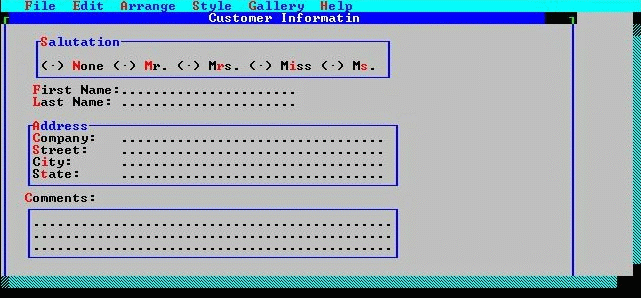
Finally, you can add the "Comments" entry field. To make room for this field, enlarge the painting window.
You can make the window even larger than you need to, to give yourself plenty of room in which to work. Later, after you have added the "Comments" field, you can make the window smaller, to just comfortably contain the form and to leave a reasonable margin.
Now, add the "Comments" field. The data length of the comments would likely be quite long. (Let's assume up to 500 characters.) However, you're not eager to devote a large amount of screen space to this field.
The solution is to make the "Comments" field a multi-line entry field with a scroll bar. This approach enables large amounts of data to be entered and viewed, but, because only a portion of the data is visible at one time, not too much screen space is required. The scroll bar enables the end-user to adjust the portion of the text visible in the field at any time.
In sizing the field, also adjust its height so that it is about twice as high as a regular entry field.
The height of the "Comments" field is adjusted so that it contains enough room for two visible lines of text.
Your form might now look like the following:
The completed Comments field.