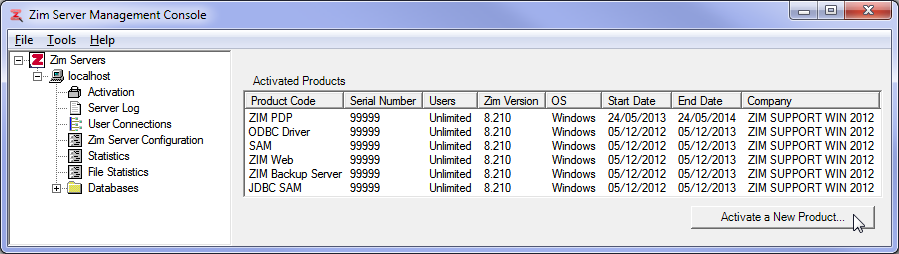
The Activation utility displays all currently activated Zim products installed on the same machine as the selected Zim Server.
Each row in the Activated Products grid corresponds to a single Zim product:
The column headers in the Activated Product grid are described in the table below:
| Column | Description |
|---|---|
| Product Code | Indicates the activated licensed product (e.g., ZIM PDP, ODBC Driver, JDBC Driver, SAM, ZIM Web, ZIM Backup Server, JDBC SAM) |
| Serial Number | The serial number used to activate the product |
| Users | The number of licensed users for the product |
| Zim Version | The Zim version compatible with the product |
| OS | The operating system for which the product was licensed |
| Start Date | The date on which the product license was activated |
| End Date | The date on which the product license will expire |
| Company | The name of the company for which the activation key was issued |
New Zim products can be activated by clicking on Activate a New Product and providing the correct information in the dialog:
Note: You will always receive, via e-mail, the required activation information (Serial Number, Activation Key and Registration Name) for any Zim product licensed to you..
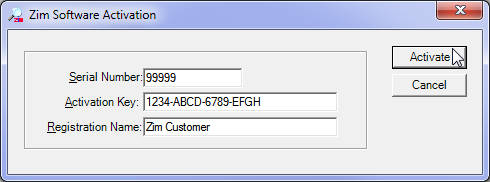
Click on Activate to complete the procedure.