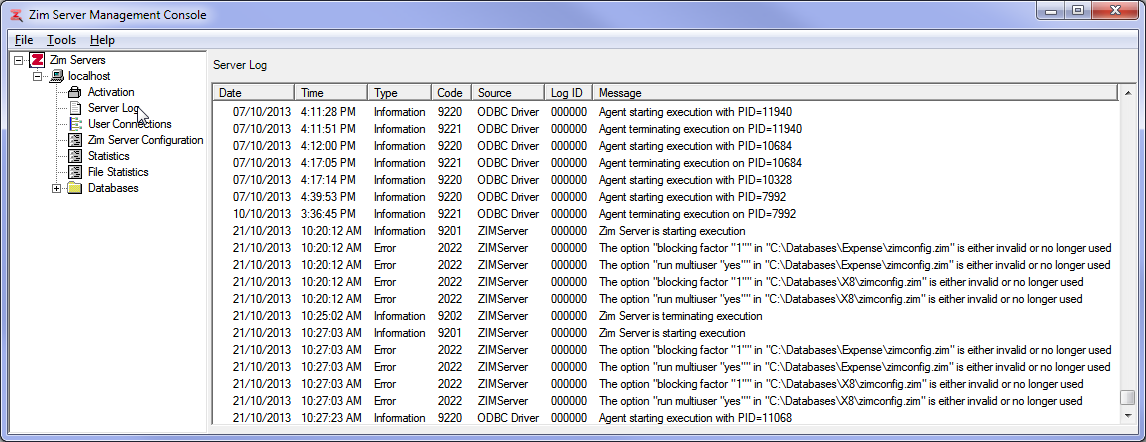
The Server Log utility displays the contents of the Zim Server log file: zimsvlog.zim.
The column headers in the Server Log grid are described in the table below:
| Header | Description |
|---|---|
| Date | The date the message was added to the log |
| Time | The time the message was added to the log |
| Type | The type of message: Information, Error, Warning |
| Code | The message code. Information messages start with 9 and Error messages start with 2 |
| Source | The process that originated the message: ODBC Driver, ZIMServer |
| Log ID | Currently not used (default: 000000) |
| Message | The messaged issued by the process |
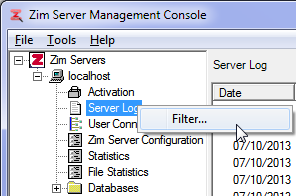
Right-click on Server Log and then click on Filter to access the server log filter
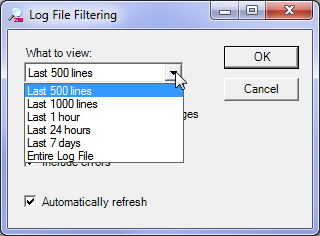
The Log File Filtering dialog will pop-up. Use it to limit the number of and the types of messages displayed in the Server Log grid.
The following drop-box options are available to limit the number of lines displayed in the log file: (Last 500 lines; Last 1000 lines; Last 1 hour; Last 24 hours; Last 7 days; and Entire Log File );
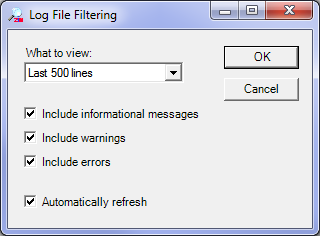
The following options, described in the table below, are used to enable or disable the displaying of specific types of messages:
| Check Box | Description |
|---|---|
| Include informational messages | When checked, messages of type Information will be displayed. |
| Include warnings | When checked, messages of type Warning will be displayed. |
| Include errors | When checked, messages of type ERROR will be displayed. |
| Automatically refresh | The utility continues to update the server log display in real time, according to the selected filter parameters. |